Earning a high income means very little if your monthly cash outflows move at the exact same velocity as your inflows. Most people do not suffer from an income problem; they suffer from an allocation problem. Without a dedicated structural lens to view where every dollar moves, subconscious lifestyle creep quietly absorbs your savings capacity, delaying long-term wealth goals.
Fortunately, you do not need expensive tools to gain that visibility. Free Personal Finance Software can provide a clear picture of your spending habits, savings progress, and financial priorities without adding another monthly subscription to your budget. By automatically tracking transactions and organizing expenses, these tools help you identify where your money is actually going and make informed decisions that support your long-term financial goals.
This is where Free Personal Finance Software becomes invaluable. Instead of relying on memory or scattered spreadsheets, modern financial tools automatically track spending, categorize transactions, and reveal patterns that would otherwise go unnoticed. By providing a clear, real-time view of your financial habits, Personal Finance Software helps you identify wasteful spending, optimize cash flow, and make more intentional decisions with your money.
To systematically break this cycle, you need to transition away from raw guesswork. Deploying the right digital infrastructure transforms your approach to capital deployment from a stressful guessing game into an automated, predictable strategy. Let’s break down the mechanics of modern free personal finance software and find the exact free platform that fits your unique behavioral patterns.
The Shift: Moving Beyond Dead Spreadsheets
For years, the standard default for tracking money has been the traditional spreadsheet. While programs like Microsoft Excel or Google Sheets are highly flexible, they are inherently retrospective. They show you exactly where your money went weeks after you spent it, forcing you to run a financial post-mortem rather than making live, proactive choices.
This limitation is one of the main reasons many people have switched to Free Personal Finance Software. Unlike static spreadsheets, modern financial tools can automatically sync transactions, update balances in real time, and alert you when spending patterns begin drifting off course. Instead of simply documenting past behavior, Free Personal Finance Software helps you make better financial decisions as they happen, giving you greater control over your budget, savings, and long-term wealth-building goals.
Furthermore, static spreadsheets break down when you try to integrate multiple data inputs. Manually copying transaction histories from three credit cards, two checking accounts, and an investment portfolio creates immense friction. Eventually, the friction wins, updates stall, and the spreadsheet becomes a dead archive.
This is where Free Personal Finance Software offers a significant advantage. Instead of requiring constant manual updates, these platforms can automatically connect to multiple financial accounts and consolidate everything into a single dashboard. With real-time synchronization and automated categorization, Free Personal Finance Software removes much of the tedious administrative work, making it easier to maintain an accurate view of your finances and stay engaged with your financial goals over the long term.
Modern personal finance management software resolves this operational drag. By standardizing your transaction feeds, these programs give you real-time visibility into your financial status. Instead of sorting through columns of disorganized numbers, you get an immediate visual layout of your capital allocation. This instant clarity makes it easy to spot hidden spending leaks and keep your money aligned with your core priorities.
Core Criteria: Evaluating Free Financial Tools
Not all free software programs are built with the same structural logic. To find a tool that genuinely supports your growth, you need to evaluate platforms across three foundational pillars: Data Collection Methodology, Monetization Structures, and Usability.
Data Collection: Automatic Feeds vs. Manual Entry
Platforms generally split into two design approaches: automated syncing via secure financial aggregators, or manual ledger tracking. Automated feeds minimize friction by pulling transactions directly from your accounts, which is ideal if you value convenience and high-level net worth tracking.
Conversely, manual tracking forces you to input transactions yourself. While this sounds tedious, it builds deep financial awareness. Because you must log every single purchase, you think twice before spending money. This extra step helps break impulse shopping habits.
Identifying the True Cost of “Free”
Building and maintaining software requires real infrastructure. If a company isn’t charging you a subscription fee, they are monetizing your presence in one of three ways:
- The Freemium Model: Providing basic budgeting features for free while gating advanced tools (like automatic bank sync, custom tags, or data exports) behind a monthly subscription.
- Financial Product Matching: Offering a completely free app but recommending high-yield savings accounts, credit cards, or personal insurance policies tailored to your spending habits.
- Absolute Open-Source Data Privacy: Community-driven software that runs entirely on your local machine, ensuring your financial information is never shared, sold, or sent to a cloud server.
The Best Personal Finance Software Programs (Free & Freemium)
The following platforms represent the absolute best options available today for structuring your financial framework without paying a premium subscription fee.
1. EveryDollar
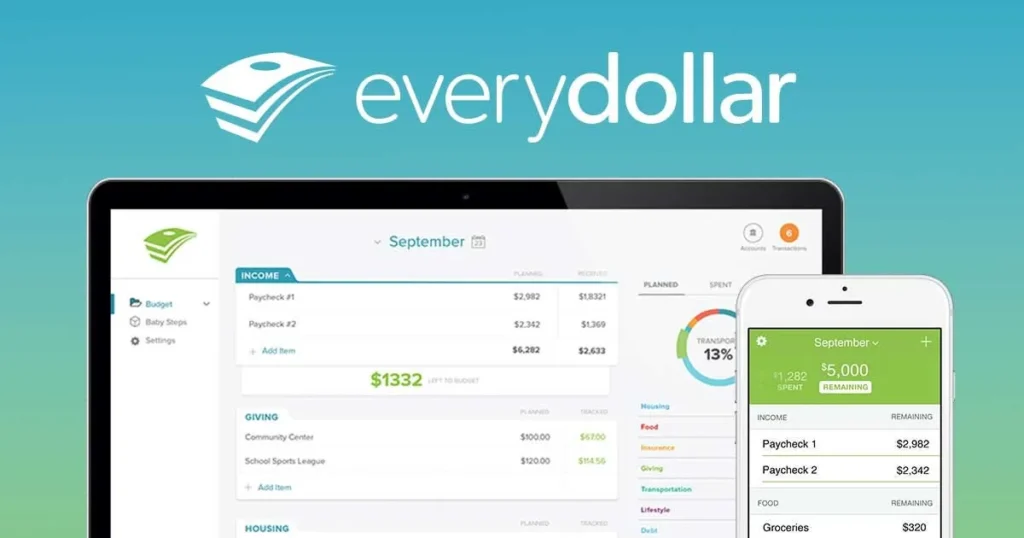
Based entirely on the zero-based budgeting philosophy, EveryDollar requires you to give every single dollar of monthly income a specific task before the month begins. The equation is straightforward: $\text{Income} – \text{Expenses} = 0$.
[Total Monthly Income]
       │
       ▼
 ┌─────────────┐
 │ EveryDollar │ ──► Allocates every cent to explicit pools
 └─────────────┘
       │
       ├─► [Fixed Bills]  ──► Rent, Utilities, Insurance
       ├─► [Variable]     ──► Groceries, Fuel, Entertainment
       └─► [Savings/Debt] ──► Emergency Fund, Brokerage
The free tier operates exclusively on manual transaction entry. This restriction is actually a core feature for behavioral modification, as manually logging expenses forces a high level of daily transaction awareness. The clean web and mobile interfaces make tracking simple, preventing you from accidentally overspending your food or entertainment categories mid-month.
2. Goodbudget
If you prefer a structured, collaborative environment, Goodbudget brings the classic paper-envelope cash system into the digital space. The app uses digital envelope balances to help you split your income across specific spending categories like groceries, transportation, and dining out.
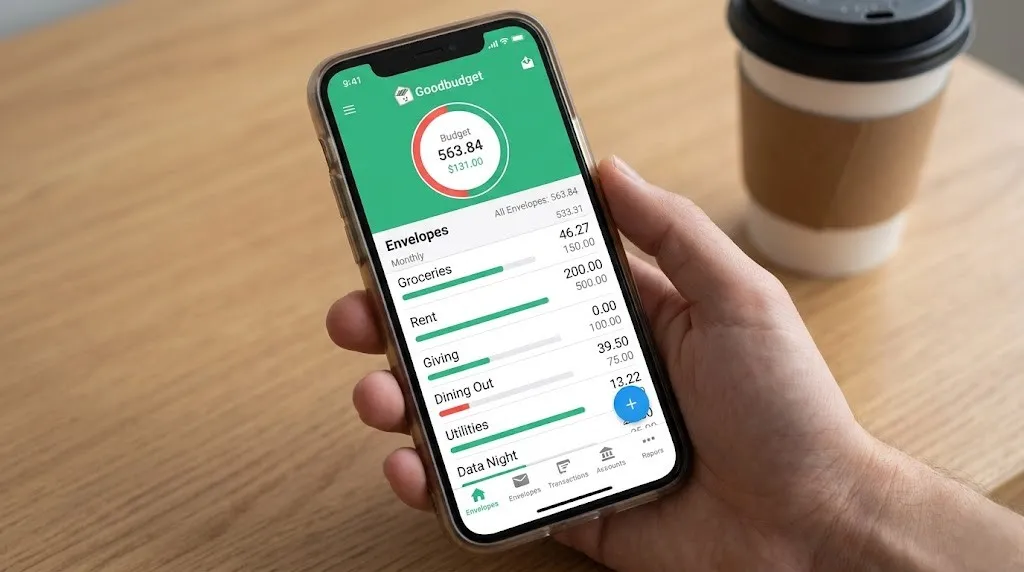
Goodbudget’s free tier allows you to create up to 20 virtual envelopes and sync your data across two separate devices. This makes it one of the best personal finance and budgeting software choices for couples or families who want to share a budget ledger without linking their individual bank accounts. You can track shared household expenses in real time, ensuring both partners stay on the same page.
3. NerdWallet
If your primary goal is tracking long-term net worth rather than micro-managing daily categories, NerdWallet offers an excellent free dashboard. It links securely to your accounts to pull balance data, building an interactive picture of your overall financial health.

Beyond basic tracking, the platform features robust credit score analysis tools and credit simulators. These engines show you exactly how financial choices—like paying down a specific credit card or opening a new line of credit—impact your overall credit rating. It is an excellent, low-maintenance option for looking at high-level financial trends.
4. GnuCash
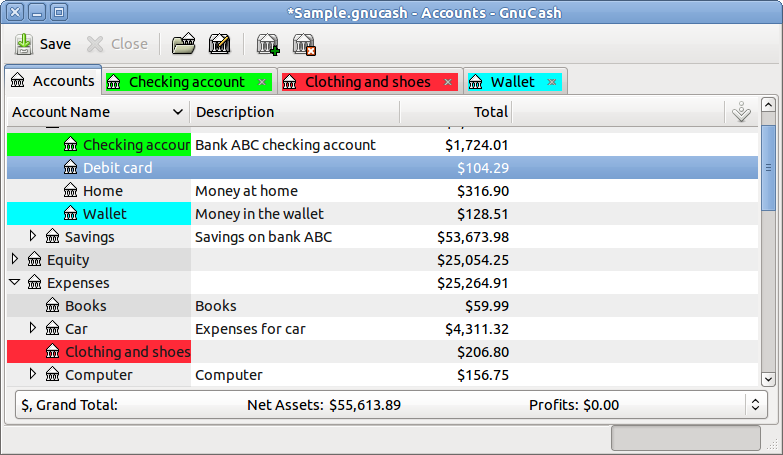
For power users who want professional-grade tools without a subscription price tag, GnuCash is a brilliant choice. It is a completely free, open-source program that uses strict double-entry accounting mechanics: every debit to one account requires a corresponding credit to another.
       ┌──────────────────┐
       │   Groceries ($)  │  (Debited / Increased)
       └──────────────────┘
                ▲
                │  [Transaction Event]
                │
       ┌──────────────────┐
       │ Checking Account │  (Credited / Decreased)
       └──────────────────┘
This structural discipline makes GnuCash an incredibly powerful piece of accounting and personal finance software. It handles complex investment tracking, stock portfolios, and small-business accounts with ease. Because it runs locally on your computer, your private data never touches an external server. However, its classic interface does come with a steeper learning curve than standard mobile apps.
5. ExpenShare
When managing a budget with roommates, organizing group travel, or tracking shared household bills with a partner, traditional automated tools often struggle. They cannot interpret who actually paid for a shared expense or how a specific bill should be divided.
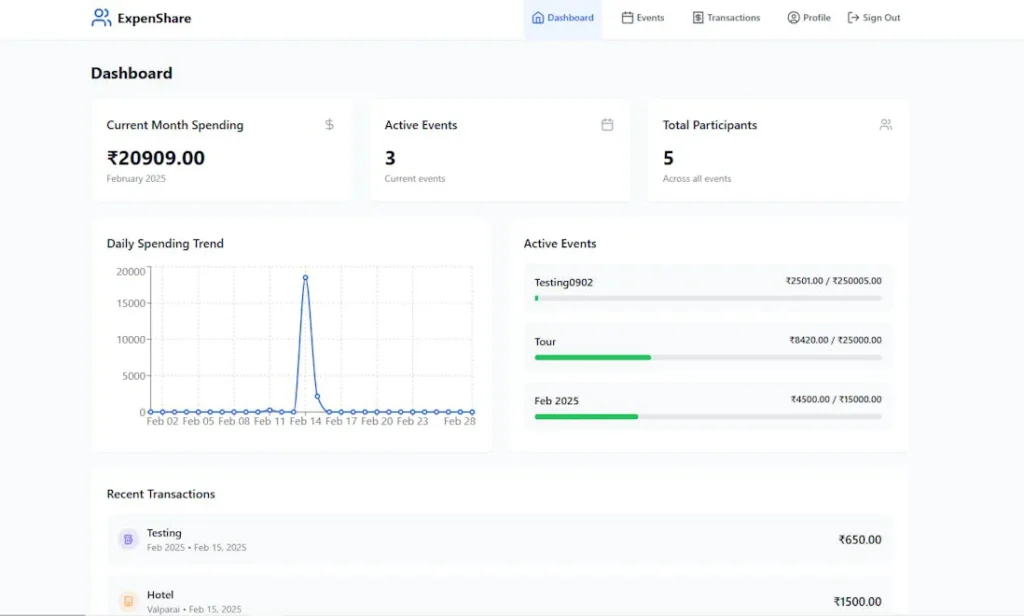
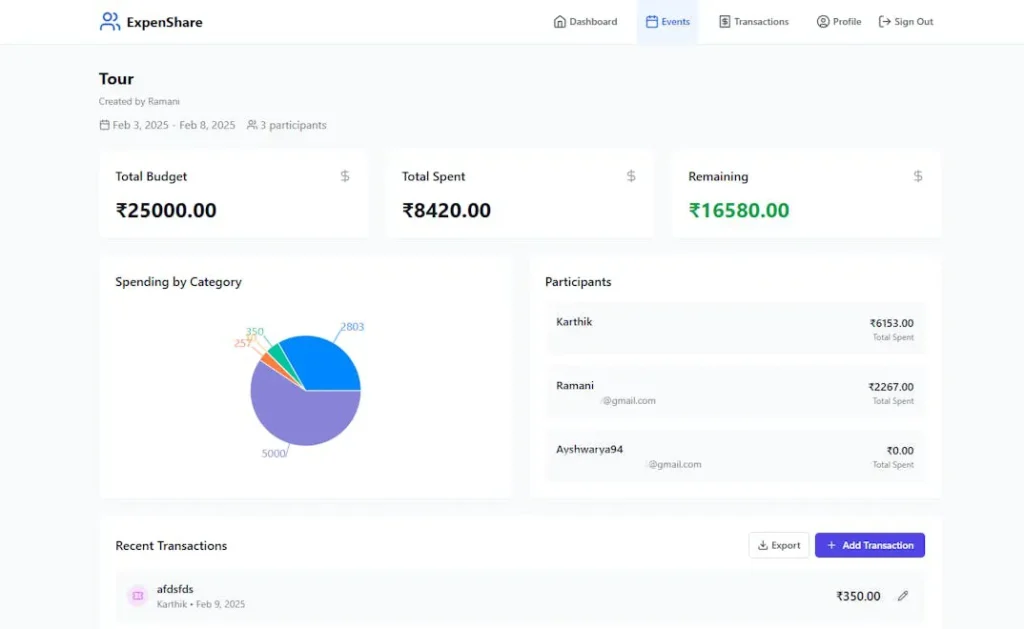
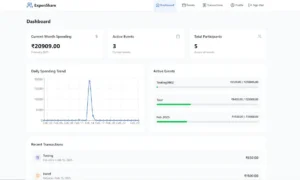
ExpenShare solves this challenge by acting as a collaborative, privacy-first shared group ledger. It operates entirely on manual entry, meaning it never asks for sensitive bank logins or credit card details. Group members log shared expenses in seconds, and the app instantly updates balances across everyone’s devices. It handles all the split-bill math automatically, helping you manage shared accounts without awkward financial conversations or messy post-trip spreadsheets.
Comparison Matrix: Finding Your Perfect Platform Match
| Platform | Core Strategy | Bank Sync Automation | Starting Price | Best Feature | Target Environment |
| EveryDollar | Zero-Based Allocation | Manual (Free Tier) | $0.00 | High personal transaction awareness | Solo Budgeting & Debt Paydown |
| Goodbudget | Digital Envelope Balances | Manual (Free Tier) | $0.00 | Simple shared family tracking | Couples & Household Budgets |
| NerdWallet | Net Worth Monitoring | Fully Automated | $0.00 | Interactive credit score simulation | High-Level Wealth Tracking |
| GnuCash | Double-Entry Accounting | Offline Imports | $0.00 | Professional-grade accounting controls | Power Users & Freelance Hybrids |
| ExpenShare | Collaborative Bill Splitting | Manual (100% Private) | $0.00 | Real-time shared group ledger sync | Roommates, Couples, & Travel Groups |
Platform Specifics: Mac Environments & Small Business Hybrid Systems
Your choice of operating system and professional background heavily influences which financial software will work best for you.
Selecting Personal Finance Software for Mac
Mac users often prioritize clean interfaces and smooth cross-device integration between macOS and iOS. While many modern tools run entirely in web browsers, native desktop apps offer a much snappier experience.
If you want a native desktop setup on Apple hardware without paying a premium price, open-source options like GnuCash provide excellent local data management. For web-based setups, platforms like EveryDollar offer smooth, responsive browser dashboards that adapt beautifully to the Mac ecosystem.
10 Essential Personal Finance Tips for Beginners
Merging Accounting and Personal Finance Software Metrics
If you are a freelancer, independent contractor, or small business owner, your personal and professional finances are often closely linked. Using basic consumer budgeting apps can leave you unprepared when it tax season arrives.
                   ┌──────────────────────────────┐
                   │ Mixed Personal/Business Cash │
                   └──────────────────────────────┘
                                  │
                  ┌───────────────┴───────────────┐
                  ▼                               ▼
       ┌────────────────────┐          ┌────────────────────┐
       │   Personal Ledger  │          │   Business Ledger  │
       │ (Housing, Dining)  │          │ (Clients, Schedule │
       └────────────────────┘          │    C Write-offs)   │
                                       └────────────────────┘
In these situations, choosing a tool with comprehensive double-entry accounting features is essential. This structural approach allows you to track business write-offs, monitor client invoices, and generate accurate cash-flow statements right alongside your personal budget. This level of organization keeps your business records clear and ensures you are fully prepared for tax filing deadlines.
Security, Privacy, and Data Management Protocols
When using financial software, protecting your personal data is just as important as tracking your balances. If you choose an automated platform that syncs with your accounts, make sure the service uses bank-grade security protocols. This means looking for platforms that use AES-256 encryption and read-only data tokens, which allow the software to display your transaction history without ever having actual access to your funds.
For users who want absolute data security, manual entry or local open-source programs are the gold standard. By keeping your financial history saved locally on your own hardware or utilizing a privacy-first manual tool like ExpenShare, you remove third-party aggregation vulnerabilities entirely. This approach keeps your data safe from cloud data leaks and automated corporate advertising profiles.
Action Plan: Unlocking Your Financial Potential
Choosing a software program is only the first step; building a consistent, sustainable routine is what actually drives financial progress. Use this structured timeline to establish your tracking system and build lasting momentum:
- Phase 1: The Collection Routine (Days 1–7): Dedicate two minutes every evening to log manual transactions or verify automated clearings. Never let unclassified transactions sit for more than 48 hours, or the tracking drag will become overwhelming.
- Phase 2: The Balance Audit (Day 14): Check your spending categories halfway through the month. Identify which areas are burning through capital faster than expected, and adjust your variable categories to compensate.
- Phase 3: The Monthly Retrospective (Day 30): Compare your actual spending against your initial targets. Use these insights to build a more accurate strategy for the coming month, making sure to route any remaining surpluses directly into your savings or investment accounts.
1. Empower Personal Dashboard — Best for Net Worth & Investment Tracking
Empower (formerly Personal Capital) approaches personal finance from a wealth-building perspective rather than micro-managing daily grocery categories. It serves as a highly robust, secure financial aggregator that connects your checking, savings, mortgages, credit cards, and investment accounts into a single, comprehensive dashboard. The software automatically calculates your live net worth and analyzes your long-term financial trajectory.
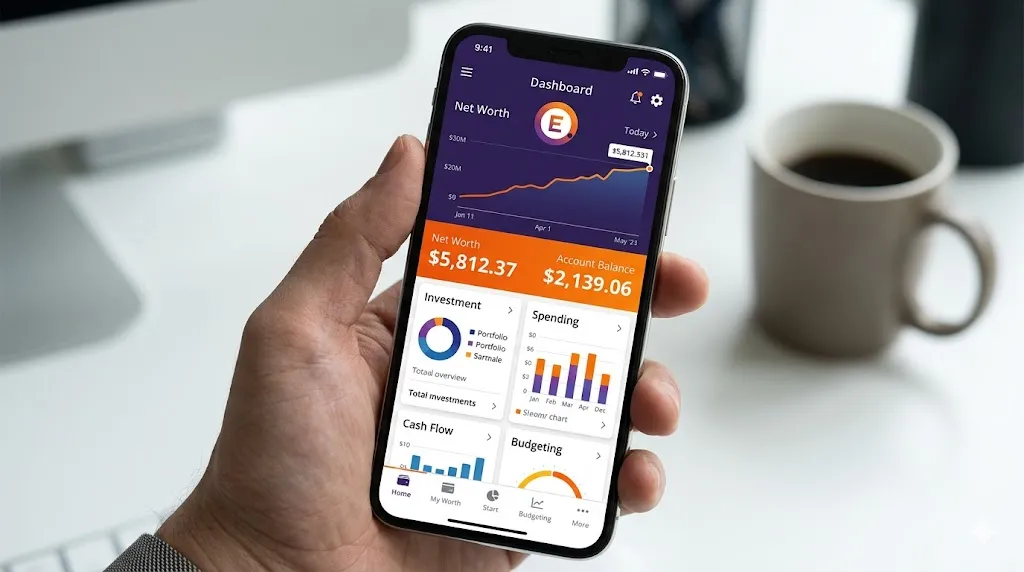
Beyond high-level tracking, it features a specialized Investment Checkup tool and an automated Fee Analyzer. These engines scan your retirement portfolios or brokerage accounts to isolate hidden advisory fees and mutual fund expense ratios that quietly drain your long-term returns.
- Core Pricing Model: 100% Free financial tracking dashboard; the platform monetizes by offering optional, human wealth management services to high-net-worth users.
- Target Audience: Individuals focused on tracking long-term investment performance, mapping retirement goals, and monitoring overall net worth.
- Pros:
- Professional-grade investment tracking and retirement fee analysis at zero cost
- Automated net worth calculation matches assets against liabilities in real time
- Highly secure, read-only data tokenization using bank-grade protocols
- Cons:
- Day-to-day granular budgeting tools are relatively basic
- You will receive occasional promotional calls or emails offering paid wealth advisory services
- Requires linking external accounts; no native support for purely offline manual ledgers
2. PocketGuard — Best for Preventing Overspending
PocketGuard simplifies the financial management process by boiling your complex budget down to a single, easily digestible number: what is safely left “In My Pocket.” The platform links with your accounts, pulls transactional data, and then automatically subtracts your fixed bills, recurring subscriptions, and personalized savings goals from your total monthly income.
The resulting figure shows exactly how much disposable cash you have left to spend for the day, week, or month without breaking your financial strategy. This design proactively prevents you from accidentally dipping into funds that are already allocated for rent or utility payments.
- Core Pricing Model: Free basic version; advanced multi-budget setups and automated bill negotiating tools require a Premium subscription.
- Target Audience: Chronic overspenders and beginners who want to curb impulse buying without micro-managing multiple category limits.
- Pros:
- The “In My Pocket” metric instantly tells you your safe-to-spend limit
- Automated subscription tracker quickly flags zombie charges and hidden bills
- Clear, low-maintenance dashboard interface updates cleanly across devices
- Cons:
- The free tier limits users to a maximum of two custom budget categories
- Advanced debt-payoff calculators and manual tracking limits are gated behind premium
- The interface features regular internal advertisements for loans and credit lines
3. Honeydue — Best for Couples and Joint Tracking
Honeydue is engineered explicitly to help couples navigate shared finances without the friction of sharing a single bank account or combining all their assets. The app allows both partners to maintain their individual personal finance tracking while linking specific views of their credit cards, checking balances, and loans into a unified space. Partners have full control over what information remains private and what gets shared.
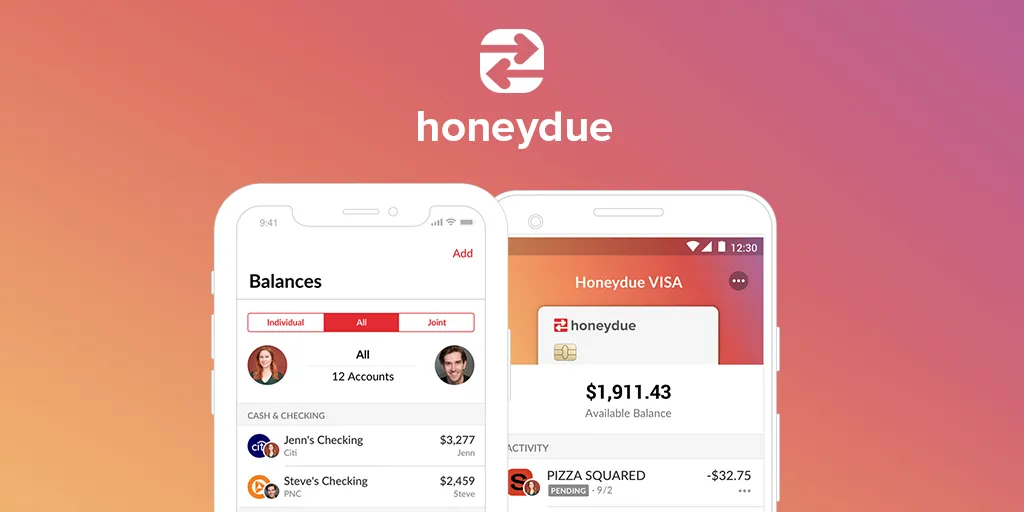
The platform includes unique features for daily collaboration, such as integrated chat windows directly inside transaction lists. Partners can leave comments on specific bills, set up split-expense tallies, and assign customized bill reminders so that payments are never missed.
- Core Pricing Model: 100% Free app; supported entirely via optional user tipping and partner financial product recommendations.
- Target Audience: Dating, engaged, or married couples who want a transparent, collaborative overview of their shared household cash flow.
- Pros:
- Allows two separate user logins to feed into a single, shared dashboard layout
- Contextual in-app chatting allows couples to discuss specific transactions cleanly
- Highly flexible privacy toggles protect individual accounts while sharing household metrics
- Cons:
- Operates strictly as a mobile app; there is no desktop web browser interface available
- Lacks advanced, long-term investment tracking or deep retirement forecasting tools
- The application frequently prompts users for voluntary tips or to view promotional financial offers
4. Wallet by BudgetBakers — Best for Global Multi-Currency Tracking
Wallet is a highly versatile personal finance manager that specializes in flexible cash flow monitoring. It is a fantastic option for expats, freelancers working with international clients, and frequent travelers because it features robust, native multi-currency tracking that links real-time exchange rates to your expenses.
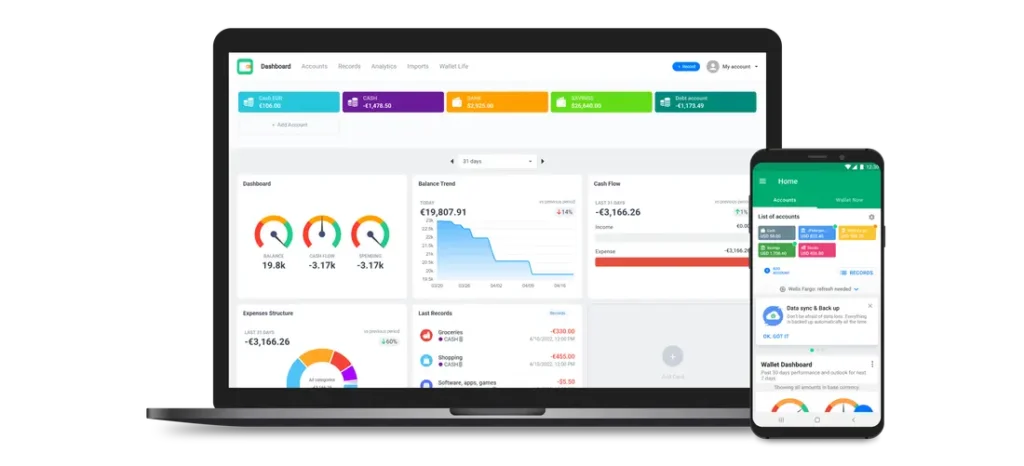
Wallet allows you to maintain a clean hybrid financial system. You can choose to connect secure automated bank feeds from thousands of global banks, or you can run purely manual cash ledgers. The app is highly praised for its highly visual charts, wheel diagrams, and transaction trend analytics that make identifying behavioral spending patterns visually effortless.
- Core Pricing Model: Free basic version with manual entries and comprehensive reporting; Premium tier unlocks unlimited automated bank syncing.
- Target Audience: Expats, travelers, and visual learners who want deep graphic reports and multi-currency budgeting controls.
- Pros:
- Exceptional multi-currency support handles complex cross-border transactions smoothly
- Beautifully designed, customizable chart displays reveal spending trends at a glance
- Free tier includes advanced exports to CSV or Excel for custom spreadsheet filtering
- Cons:
- Real-time automated bank syncing is restricted to the paid premium tier
- The multi-user budget collaboration tools require a premium upgrade
- Free account users will experience regular in-app banner ads
5. Monefy — Best for Fast, Visual Manual Logging
Monefy completely eliminates the heavy structural setup and operational drag often associated with personal finance management software. It operates on a pure tap-and-log manual design concept: the main screen consists of a central balance wheel surrounded by quick-action category icons (such as groceries, transport, entertainment, and health).
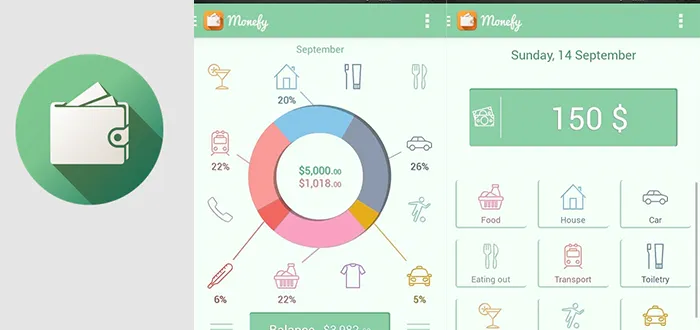
When you make a purchase, you simply tap the corresponding icon, type in the exact transaction amount, and hit save. The entry is logged in under three seconds. This lightning-fast process removes the resistance of manual tracking, making it incredibly simple to keep a real-time record of your spending throughout the day.
- Core Pricing Model: Free basic version; Pro version unlocks custom category icons, passcode protection, and advanced synchronization.
- Target Audience: Busy individuals who want a highly streamlined, visual way to manually track expenses on the go without syncing bank data.
- Pros:
- One of the fastest manual data entry workflows available across mobile platforms
- Intuitively clear visual distribution chart forms the centerpiece of the user experience
- Free tier supports automatic data backup and sync via your personal Dropbox or Google Drive
- Cons:
- Completely lacks any automated bank-syncing or electronic transaction reading features
- Budgeting parameters are strictly linear; it does not support advanced envelope or zero-based tracking rules
- Creating custom spending categories requires an upgrade to the paid version
Frequently Asked Questions (FAQ)
Is free personal finance software safe to use?
Yes, provided you understand how the platform secures its data. Apps that use automated bank syncing should route information through established, read-only financial aggregators. If you want absolute security, choose open-source local programs or manual tracking tools that don’t require your bank login details.
How does free financial software differ from paid alternatives like Quicken?
Legacy paid programs like quicken personal finance software offer deep features for complex investment tracking, property depreciation, and tax planning. Free options usually focus on core budgeting and debt reduction tools. For most households, free platforms provide all the utility needed to manage money effectively without an extra monthly bill.
Can I manage a small business using consumer budgeting software?
Basic consumer apps generally struggle with business accounting needs like invoicing, inventory tracking, and tax categorization. If you run a small business, look for open-source accounting tools like GnuCash. These give you the professional frameworks required to generate accurate balance sheets and track business write-offs cleanly.
Why should I choose manual data entry over automatic syncing?
While automatic syncing saves time, it can cause you to become disconnected from your day-to-day spending choices. Manual entry forces a moment of reflection every time you make a purchase. This small behavioral speed bump is incredibly effective at reducing impulse spending and helping you stay budget-conscious.
How do collaborative budgeting apps handle data syncing across multiple users?
Platforms designed for shared tracking use cloud-based syncing to update a central ledger instantly. When one user logs a transaction, the change updates immediately across all linked devices. This gives everyone a clear, real-time view of group balances without needing to share passwords or link personal bank accounts.
For deeper frameworks on consumer protection and wealth building, explore the official guidelines provided by theConsumer Financial Protection Bureauand review the comprehensive financial planning indices hosted onInvestopedia.